Passwords are one of the simplest and most important ways to protect your online accounts. We use passwords for email, social media, online banking, shopping websites, work accounts, gaming accounts, and many other services. If someone gets your password, they may be able to access your personal information, send messages from your account, steal money, or use your account to attack other people.
Choosing a strong password does not have to be difficult. By following a few simple rules, you can make your accounts much harder for attackers to break into.
1. Make Your Password Long
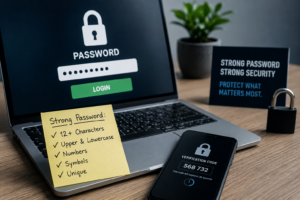
One of the most important things about a password is its length. A longer password is usually much harder for an attacker to guess than a short password.
For example, a password such as Tiger123 is short and easy to guess. Adding more random characters can make a password stronger.
Instead of using a short password, consider using a long passphrase made from several unrelated words. For example, you could create something similar to:
River-Coffee-Planet-Window
Do not use this exact example as your real password. The idea is to use several words together to create something long and difficult to predict.
For important accounts, aim for a password or passphrase that is at least 14 characters long when the service allows it.
2. Do Not Use Personal Information
Avoid using information that other people can easily discover about you.
For example, do not use:
- Your name
- Your birthday
- Your phone number
- Your address
- Your pet’s name
- Your school
- Your workplace
- Your favourite sports team
- Your child’s name
- Your partner’s name
Information about you can sometimes be found on social media. An attacker who knows your name and looks through your public profiles may be able to guess some of these details.
A password should be difficult for someone who knows you to predict.
3. Never Use the Same Password Everywhere
Using one password for every account can be dangerous.
Imagine that you use the same password for your social media account, email account, and online shopping account. If one website suffers a data breach and your password is stolen, an attacker may try the same password on your other accounts.
This is called credential stuffing.
Instead, use a different password for every important account. Your email account, banking account, social media accounts, and other important services should not all have the same password.
This can seem difficult because you may have many accounts. A password manager can help solve this problem.
4. Consider Using a Password Manager
A password manager is a tool that can securely store your passwords. Instead of remembering dozens of different passwords, you only need to remember one strong master password.
A password manager can also create long, random passwords for you.
For example, instead of creating passwords yourself, the password manager might generate a completely random password containing letters, numbers, and symbols.
This is useful because humans are not very good at remembering dozens of random passwords.
Before choosing a password manager, make sure it is a reputable service and protect the manager itself with a strong master password and multi-factor authentication where available.
5. Avoid Common Passwords
Attackers do not always randomly guess passwords. They often start with passwords that millions of people commonly use.
Avoid passwords such as:
123456
password
qwerty
admin
welcome
12345678
Also avoid simple variations such as Password1 or Password123.
Changing one character in a very common password does not necessarily make it secure.
6. Be Careful With Password Patterns
People often create passwords using predictable patterns.
For example:
Summer2025
Then the next year they might change it to:
Summer2026
This may look like a new password, but it is still predictable.
Another common pattern is using a website name with a number at the end, such as:
Facebook123
or
Google123
Avoid predictable patterns that make your passwords easier to guess.
7. Use Different Passwords for Important Accounts
Not every account has the same level of importance.
Your email account is especially important because it can often be used to reset the passwords for other accounts.
For example, if someone gets access to your email, they may be able to request password-reset links for your social media, shopping, or other online accounts.
Your banking and financial accounts are also extremely important.
Make sure your most important accounts have unique and strong passwords.
8. Turn On Multi-Factor Authentication
A strong password is important, but it should not be your only layer of protection.
Whenever possible, enable multi-factor authentication (MFA) or two-factor authentication (2FA).
With MFA, logging in usually requires something in addition to your password. This could be an authentication app, security key, or another verification method.
For example, even if an attacker discovers your password, they may still be unable to access your account without the second authentication factor.
MFA is particularly important for email, banking, cloud storage, social media, and other sensitive accounts.
9. Do Not Share Your Password
Never share your password with friends, strangers, or people who contact you unexpectedly.
A legitimate company should not normally need you to send your password through email, text message, or social media.
Be especially careful when someone asks you to provide your password because of an “urgent security problem.”
This could be a phishing attempt.
Instead of clicking a suspicious link, open the company’s official website or app yourself and check your account there.
10. Watch Out for Phishing
Sometimes attackers do not try to guess your password. Instead, they try to trick you into giving it to them.
This is called phishing.
For example, you might receive a message saying:
“Your account will be locked today. Click here to verify your password.”
The message may look like it came from a real company, but the link could take you to a fake website designed to steal your login details.
Always check unexpected messages carefully. Look at the sender, the website address, and the reason you are being asked to log in.
When in doubt, go directly to the official website instead of using a link in the message.
11. Do Not Save Passwords in Public Places
Never write your passwords on a public computer or leave them where other people can easily see them.
If you use a shared computer, make sure you log out when you finish.
Also avoid saving passwords in places that are not designed to protect sensitive information.
A reputable password manager or your device’s built-in password manager can provide a safer way to store passwords.
12. Be Careful When Someone Asks for Your Password
Scammers may pretend to be technical support staff, bank employees, delivery companies, employers, or even friends.
They may tell you that they need your password to fix a problem.
Do not automatically trust the person just because they know some information about you.
If someone unexpectedly asks for your password, stop and verify who they are using an official contact method.
13. Change a Password When There Is a Reason
You do not necessarily need to change every password constantly just because time has passed.
However, you should change a password if you believe it has been exposed, stolen, reused on a breached website, or shared with someone who should not have it.
If a service tells you that your password was involved in a data breach, take the warning seriously.
Change the affected password and make sure you are not using the same password anywhere else.
14. Think About Your Email Account First
Your email account deserves special attention.
Think of your email address as a key to many other accounts. Password-reset messages for other services often go to your email.
If an attacker gets access to your email, they may be able to reset passwords for other accounts.
Use a unique, strong password for your email and enable MFA if available.
15. Do Not Use Passwords From This Article
The examples in this article are only examples.
Never copy an example password from a website, social media post, video, or security article and use it for your real account.
Thousands of people could see the same example.
Instead, create your own unique password or use a reputable password manager to generate one.
A Simple Password Checklist
Before using a new password, ask yourself:
- Is it long enough?
- Is it unique?
- Does it avoid personal information?
- Is it different from my other important passwords?
- Is it difficult for someone who knows me to guess?
- Have I avoided common words and predictable patterns?
- Can I store it safely in a password manager?
- Have I enabled MFA on the account?
If the answer to these questions is yes, your password is likely to provide much better protection than a short, common, or reused password.
Final Thoughts
A strong password is an important part of online security. You do not need to create complicated passwords that are impossible to remember. The most important ideas are to make passwords long, unique, and difficult to predict.
Avoid using personal information, common passwords, and the same password on multiple websites. Consider using a reputable password manager to create and store unique passwords. Most importantly, enable multi-factor authentication whenever it is available.
Remember that cybersecurity is about using multiple layers of protection. A strong password is one layer. MFA, careful browsing, software updates, secure devices, and awareness of phishing attacks can provide additional protection.
Taking a few minutes to improve your passwords today can make your online accounts much safer tomorrow.